Building a DeltaTwin® with dependencies
Welcome to this tutorial which will help you to create your own DeltaTwin® using the command line interface (CLI Documentation ) and publish it to our cloud environment.
This example is based on a dummy drought indicator model, developed for demonstration purpose without any scientific reference.
Currently, DeltaTwin®service offers a set of ready-to-use DeltaTwin®components available through its online gallery, called the Starter Kit. For example, any user can access to:
- the
band-extractorDeltaTwin®to extract a band from a Sentinel-2 product - the
index-calculatorDeltaTwin®to compute an index from two Sentinel-2 product bands. It is a generic component to compute spectral inices like NDVI (Normalised Difference Vegetation Index)
We will see, step by step, how to take advantage of these still-available components when building your own DeltaTwin.
We will build a DeltaTwin®based on the computation of NDVI (Normalised Difference Vegetation Index), NDWI (Normalised Difference Water Index) and NDMI (Normalised Difference Moisture Index) values extracted from Sentinel 2 Level 1C or Level 2A products. Then, we will add a dummy model that applies a threshold to these indices values to obtain a classification with 3 levels of drought.
Prerequisite
It requires:
- Linux or Mac Operating system
- Python 3.11 or 3.12
- docker-engine
- DeltaTwin® Command Line Interface (CLI Documentation ) to be installed.
We recommend the reading of basic tutorial. Here, we will focus on how to define dependencies with other DeltaTwin® components and assume you already know how to use the Manifest adn Workflow files.
Create the DeltaTwin®
Create or enter a target root directory on local disk
Run deltatwin component init <project_name>
deltatwin component init <project_name>Edit the manifest.json file
Fill the DeltaTwin® description fields.
For example,
{
  "name": "tutorial-drought-indicator",
  "description": "Sentinel-2 Drought indicator",
  "license": {
    "name": "GPLv3",
    "url": "https://www.gnu.org/licenses/gpl-3.0.html",
    "copyrights": [
      { "years": [2024], "company": "GAEL Systems" }
    ]
  },
  "owner": "GAEL Systems",
....
Do not use uppercase characters, or underscore (_) for name property.
Furthermore, please note that DeltaTwin® names must be unique within the service. A DeltaTwin® component cannot be published if its name is already in use.
Set the global inputs exposed to end-user
Here, we want the user to provide an URL to a remote Sentinel-2 product, so we use the type Data:
   ....
  "inputs": {
    "product": {
      "type": "Data",
      "description": "Sentinel-2 Level 1C or 2A"
    }
  },
Set the global outputs exposed to end-user
As our DeltaTwin® provides at each run 2 outputs:
- a drought indicator file containing the computed values.
- a colored map representation of the computed values.
    ....
  "outputs": {
      "drought_indicator": {
        "type": "Data",
        "description": "a table of drought levels (0: No drought, 1: intermediate, 2: Drought)"
      },
      "drought_map_representation": {
        "type": "Data",
        "description": "map representation of drought indicator"
      }
    },
Fill the Resources section
The DeltaTwin, sometimes, needs resources for its execution. We use the property resources to describe them. A resource is a data referenced by the process, that needs to be downloaded before or during the process execution. In this example, we want to automatically extract 4 bands from our Sentinel2 product and provide them as input to a DeltaTwin®component. To do that, we declare them in the Resources section of the manifest.json file
    ....
  "resources": {
      "band_03": {
        "type": "string",
        "value": "B03"
      },
      "band_04": {
        "type": "string",
        "value": "B04"
      },
      "band_08": {
        "type": "string",
        "value": "B8A"
      },
      "band_11": {
        "type": "string",
        "value": "B11"
      }
    }
Fill the Models section
For our example, we add one model : a Python script named drought-calculator. We store it under the models/drought-calculator directory.
Then, we fill the models section of the manifest.json file by adding
- the model name, its path location and language type
- the prerequsite parameters to configure the execution environment, namely external dependencies to be installed before running the script
- the command to start the script
- the expected inputs types
- the generated outputs types
  ....
  "models": {
      "drought-calculator": {
        "path": "models/drought-calculator",
        "type": "python",
        "parameters": {
          "pythonVersion": "3.11",
          "aptRequirements": [
            {
              "name": "gdal-bin",
              "version": "3.6.2+dfsg-1+b2"
            },
            {
              "name": "libgdal-dev",
              "version": "3.6.2+dfsg-1+b2"
            }
          ],
          "pipRequirements": [
            {
              "name": "rasterio",
              "version": "1.3.9"
            },
            {
              "name": "matplotlib",
              "version": "3.8.3"
            }
          ],
          "command": "python drought_calculator.py $(inputs.ndvi) $(inputs.ndmi) $(inputs.ndwi)"
        },
        "inputs": {
          "ndvi": {
            "type": "Data",
            "description": "NDVI index calculated using dependency twin index-calculation"
          },
          "ndmi": {
            "type": "Data",
            "description": "NDMI index calculated using dependency twin index-calculation"
          },
          "ndwi": {
            "type": "Data",
            "description": "NDWI index calculated using dependency twin index-calculation"
          }
        },
        "outputs": {
          "indicator": {
            "type": "Data",
            "glob": "drought_indicator.tif"
          },
          "map": {
            "type": "Data",
            "glob": "drought_map_representation.png"
          }
        }
      }
    },
    ...
Fill the Dependencies section
This section enables to set the dependencies with remote DeltaTwin®components, i.e. DeltaTwin® available through the Starter Kit Gallery.
For each dependencies, we add its name and version number.
  "dependencies": {
      "band-extractor": {
        "id": "band-extractor",
        "version": "1.0.1"
      },
      "index-calculator": {
        "id": "index-calculation",
        "version": "1.0.1"
      }
    }
The complete file is available here.
Edit the workflow.yml file
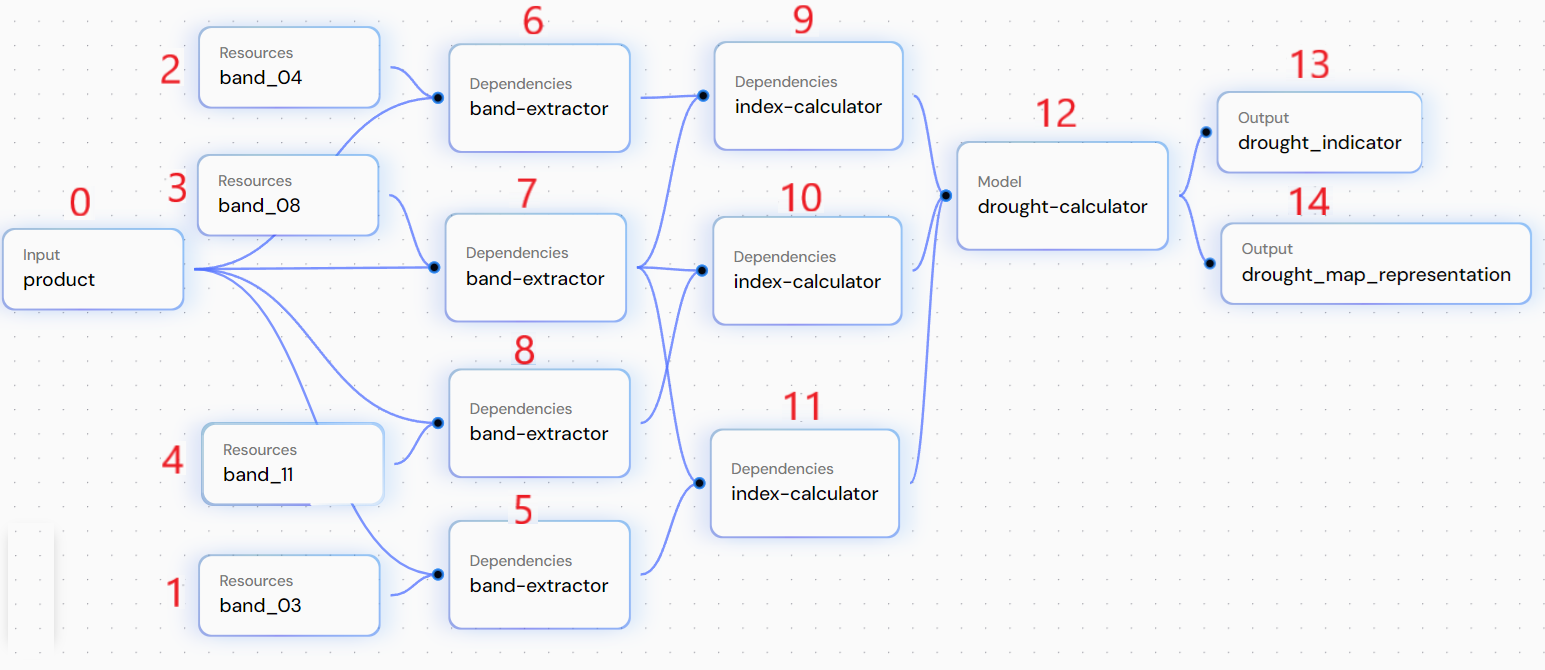
This file enables to describe the workflow used for running orchestration. It describes how the different elements of the model will act to achieve the process.
In our case, we have:
- a input (URL to a Sentinel-2 product)
- resources to define the names of the band to be extracted
- dependencies to other DeltaTwin®components
- a model
- the output
The numbers represent the identifier in file workflow.yml, as illustrated below. We can describe this workflow:
To proceed :
Edit the workflow.yml file
Reference each nodes
(i.e. inputs, ressources,dependencies, models and outputs name) of your workflow by specifying an id number and its reference.
nodes:
  - id: 0
    ref: inputs.product
  - id: 1
    ref: resources.band_03
  - id: 2
    ref: resources.band_04
  - id: 3
    ref: resources.band_08
  - id: 4
    ref: resources.band_11
  - id: 5
    ref: dependencies.band-extractor
  - id: 6
    ref: dependencies.band-extractor
  - id: 7
    ref: dependencies.band-extractor
  - id: 8
    ref: dependencies.band-extractor
  - id: 9
    ref: dependencies.index-calculator
  - id: 10
    ref: dependencies.index-calculator
  - id: 11
    ref: dependencies.index-calculator
  - id: 12
    ref: models.drought-calculator
  - id: 13
    ref: outputs.drought_indicator
  - id: 14
    ref: outputs.drought_map_representation
Define each edges
Define the source (from) and the destination (to), to describe the relationships between nodes, as below:
edges:
  - from:
      id: 0
    to:
      id: 6
      port: product
  - from:
      id: 2
    to:
      id: 6
      port: bandName
Explanation
The band-extractor (#6) has two inputs, the URL of the product (#0) and the band name to extract (#2) which is band_04.
- from:
      id: 9
      port: indexImage
    to:
      id: 12
      port: ndvi
    ...
You can download the example file here.
Run locally
The DeltaTwin® Command Line enables you to run locally your DeltaTwin®.
deltatwin run start_local -i inputs_file_example.jsoninputs_file_example.json is a file that contains all input values.
You can find below an example that takes as input the URL of a Sentinel-2 product.
{
  "product":{
    "type" : "Data",
    "name" : "product",
    "value": "https://vision.odata.gael.fr/odata/v1/Products(9aa272d4-0f6e-4b1a-8667-4eeb72bd541c)/$value"
  }
}
Local Run Limitation
When running DeltaTwin® components locally, some input types are not supported:
- DriveData: Resources stored in DeltaTwin® Drive cannot be accessed remotely for local execution. You must download these files manually and update the manifest to reference the local path.
- Secret: Sensitive or secure data management mechanism cannot be used locally, you may use the
stringtype. - URL with SesamEO API Key
Run on DeltaTwin® cloud environment
DeltaTwin® service provides a cloud environment to store and run your DeltaTwin® project.
To proceed, you will need to publish your DeltaTwin® by using the command deltatwin component publish (see CLI Documentation for more details).
For example, to publish the previous rotation DeltaTwin® as version 0.1, enter:
deltatwin component publish http://repository_url 0.1 -t demo -v private -C "New version of my Deltatwin"The optional parameters indicates that:
-t demois a topic name for referencing our project. Later, you will be able to search DeltaTwin® by topic name.-v privatemeans that the DeltaTwin® is only visible to you. If you set topublicthe DeltaTwin® will be visible and runnable by any user.-C "something"refers to the changelog we want to add to the DeltaTwin® Once published, you can remotly run your DeltaTwin® component either with the command line or by using the DeltaTwin® web application.
The following command enables to get the DeltaTwin® name :
deltatwin component listNow, use the name to run your DeltaTwin® :
deltatwin run start TWIN_NAME -i inputs_file_example.json